By Sarthak Sharma — Full-Stack Engineer & Systems Builder, Kathmandu, Nepal
Sajilo Patro - Nepali Calendar for macOS menubar APP
The lightweight, offline, and free to use Nepali calendar app for the macOS menubar. Features interactive desktop widgets, official Nepal public holidays (BS 2083), daily lunar tithi, Google Calendar sync, and instant offline BS ↔ AD conversion. Built end-to-end with Tauri 2, Rust, React, and TypeScript.
brew install --cask ssarthaks/tap/sajilo-patronpm package: npm install sajilo-patroTarget OS: macOS 11 Big Sur to macOS 26 Tahoe (Apple Silicon & Intel)Every Nepali developer, designer, business professional, and student working on an Apple Mac encounters the exact same daily friction: What is today's Nepali date?
Apple macOS natively supports the Gregorian calendar alongside Buddhist, Japanese, Islamic (Hijri), and Hebrew eras. But for the 30+ million people in Nepal and millions across the diaspora who live, work, and celebrate according to Bikram Sambat (BS — विक्रम संवत्), macOS provides zero built-in support.
For over a decade, the only options available to Mac users were clumsy compromises: opening a browser tab to search for web calendars, navigating ad-heavy portals like Hamro Patro or Nepali Patro loaded with slow banner scripts, tracking cookies, and autoplay video advertisements, or constantly reaching for a smartphone in the middle of a focused coding or writing session.
I wanted something radically better: an elegant, zero-latency, 100% offline macOS menu bar utility that places today's Bikram Sambat date right next to the Mac's clock. One click reveals the full month calendar, official Government of Nepal public holidays, and lunar tithi without interrupting your active window or stealing focus. On the desktop wallpaper, interactive Liquid Glass widgets keep you anchored throughout your workday.
In this architectural breakdown, I explain the engineering decisions behind Sajilo Patro and its open-source calendar engine — spanning Vedic astronomical mathematics, sub-microsecond epoch conversion, Tauri 2 Rust AppKit window management, asymmetric Ed25519 offline licensing, and automated Homebrew distribution.
Part 1: The Frustration — Why Web Portals Failed the Desktop Workflow
To understand why Sajilo Patro was necessary, we have to examine the technical limitations of the existing Nepali calendar ecosystem on desktop computers.
1. The Cognitive Penalty of Context Switching
When you are working in an IDE (like Xcode, VS Code, or Antigravity), writing legal briefs, or balancing financial spreadsheets, asking for today's date should be a subconscious, 200-millisecond glance. Having to:
- Open a web browser or create a new browser tab,
- Type a search query or open a heavy bookmark,
- Wait 2 to 4 seconds for DNS resolution, HTML rendering, and network bundles to load,
- Close banner ads and avoid click-bait video overlays,
destroys developer flow state. Studies in human-computer interaction (HCI) demonstrate that even a 3-second interruption requires up to 20 minutes to regain deep cognitive focus.
2. Memory Overhead & Battery Degradation
Modern web portals are bloated. Leaving a single Nepali calendar portal open in a pinned Chrome or Safari tab consumes between 120 MB and 250 MB of RAM, and continuously executes background JavaScript timers for advertising networks, analytics beacons, and social widgets. On a MacBook running on battery, this continuous background polling keeps CPU cores in higher power states, shaving precious battery hours off your workday.
3. Total Offline Failure
Nepal is a country where connectivity can fluctuate, and remote workers often travel across rural regions, high-altitude trails, or long flights without WiFi. If your calendar requires an HTTP connection to tell you whether tomorrow is a public holiday or an Ekadashi fast, it is fundamentally unreliable as a system utility.
Part 2: The Astronomical & Mathematical Anatomy of Bikram Sambat
The first engineering hurdle was developing a bulletproof, mathematically rigorous model of the Bikram Sambat calendar. Converting between Bikram Sambat and the Western Gregorian calendar is not a simple linear offset.
1. Solar-Sidereal Transits vs Fixed Solar Years
The Western Gregorian calendar follows a tropical solar cycle. It approximates the solar year at 365.2425 days using fixed month lengths (30 or 31 days, and 28/29 days for February) governed by arithmetic leap-year rules:
// Gregorian leap year determination: purely modular arithmetic
function isGregorianLeapYear(year: number): boolean {
  return (year % 4 === 0 && year % 100 !== 0) || year % 400 === 0;
}
In contrast, Bikram Sambat is a solar-sidereal calendar based on the principles of the ancient Indian astronomical treatise Surya Siddhanta. A Bikram Sambat year begins on Baisakh 1 (वैशाख १), which marks Mesha Sankranti — the exact celestial moment when the Sun crosses from Pisces (Mīna) into Aries (Meṣa) along the sidereal zodiac.
- Variable Month Durations: Because the Earth's orbit around the Sun is elliptical (Kepler's First Law), its orbital velocity varies from perihelion (fastest in January) to aphelion (slowest in July). The time it takes for the Sun to traverse each 30-degree zodiac segment (Rāśi) is unequal. Therefore, a Nepali month can have 29, 30, 31, or 32 days, and this number changes from year to year.
- No Closed-Form Formula: There is no mathematical equation that can calculate whether Baisakh in BS 2085 will have 31 days or 32 days without referencing astronomical ephemeris calculations.
- Sidereal Precession: The sidereal year is approximately 365.25636 days (~20 minutes longer than the tropical year). Over centuries, this causes Bikram Sambat months to drift very slowly relative to Gregorian months.
2. Calculating Lunar Tithi (तिथी) at Kathmandu Sunrise
Beyond civil dates, everyday life in Nepal is deeply intertwined with the lunar calendar. Religious observances, dietary fasts (such as Ekadashi), full moon celebrations (Purnima), and new moon rituals (Aunsi) are determined by theTithi.
A tithi is defined by the Moon advancing 12 degrees of angular longitudinal separation from the Sun:
// Angular separation defining lunar tithi
TithiIndex = Math.floor(((MoonLongitude - SunLongitude) % 360) / 12);
Because the Moon's velocity fluctuates significantly along its eccentric orbit, a single tithi can vary in duration between 19 and 26 hours. Crucially, the official tithi assigned to a calendar day in Nepal is determined by the tithi active at the precise moment of sunrise in Kathmandu (27.7172° N, 85.3240° E). If a tithi ends two minutes before sunrise, the day is assigned the subsequent tithi. Sajilo Patro computes daily tithi strictly anchored to Kathmandu sunrise coordinates.
3. Hand-Transcribing Official Nepal Public Holidays (BS 2083)
Public holidays in Nepal are legally mandated by executive decrees published in the official Nepal Gazette (Nepal Rajpatra, नेपाल राजपत्र) by the Ministry of Home Affairs. These holidays are not merely a single list; they carry strict demographic and geographical scopes:
- Nationwide Public Holidays: Offices, banks, and schools closed everywhere (e.g. Dashain, Tihar, Constitution Day, Republic Day).
- Kathmandu Valley Specific: Holidays observed only within Kathmandu, Lalitpur, and Bhaktapur (e.g. Ghode Jatra, Gai Jatra, Indra Jatra, Bhoto Jatra).
- Community & Religious Holidays: Holidays granted specifically to ethnic or religious groups (e.g. Eid-ul-Fitr, Bakra Eid, Udhauli/Ubhauli, Sonam/Gyalpo/Tamu Lhosar, Chhath).
- Demographic Holidays: Specific observances (e.g. Teej for women employees, International Day of Persons with Disabilities).
Instead of scraping untrusted third-party blogs, I transcribed and verified every single holiday for BS 2083 directly from the Ministry of Home Affairs Rajpatra notification into structured JSON models.
System Architecture Overview
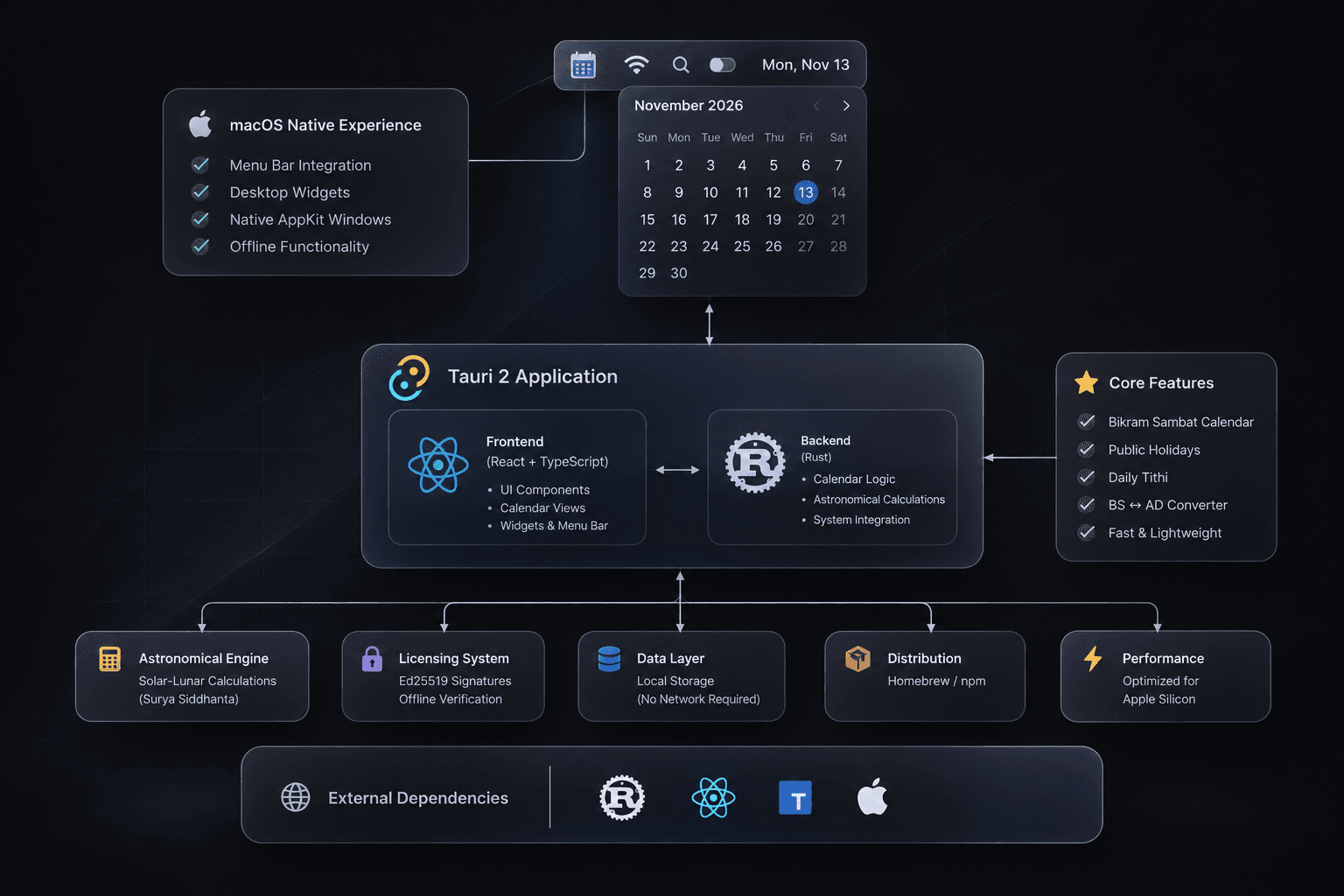
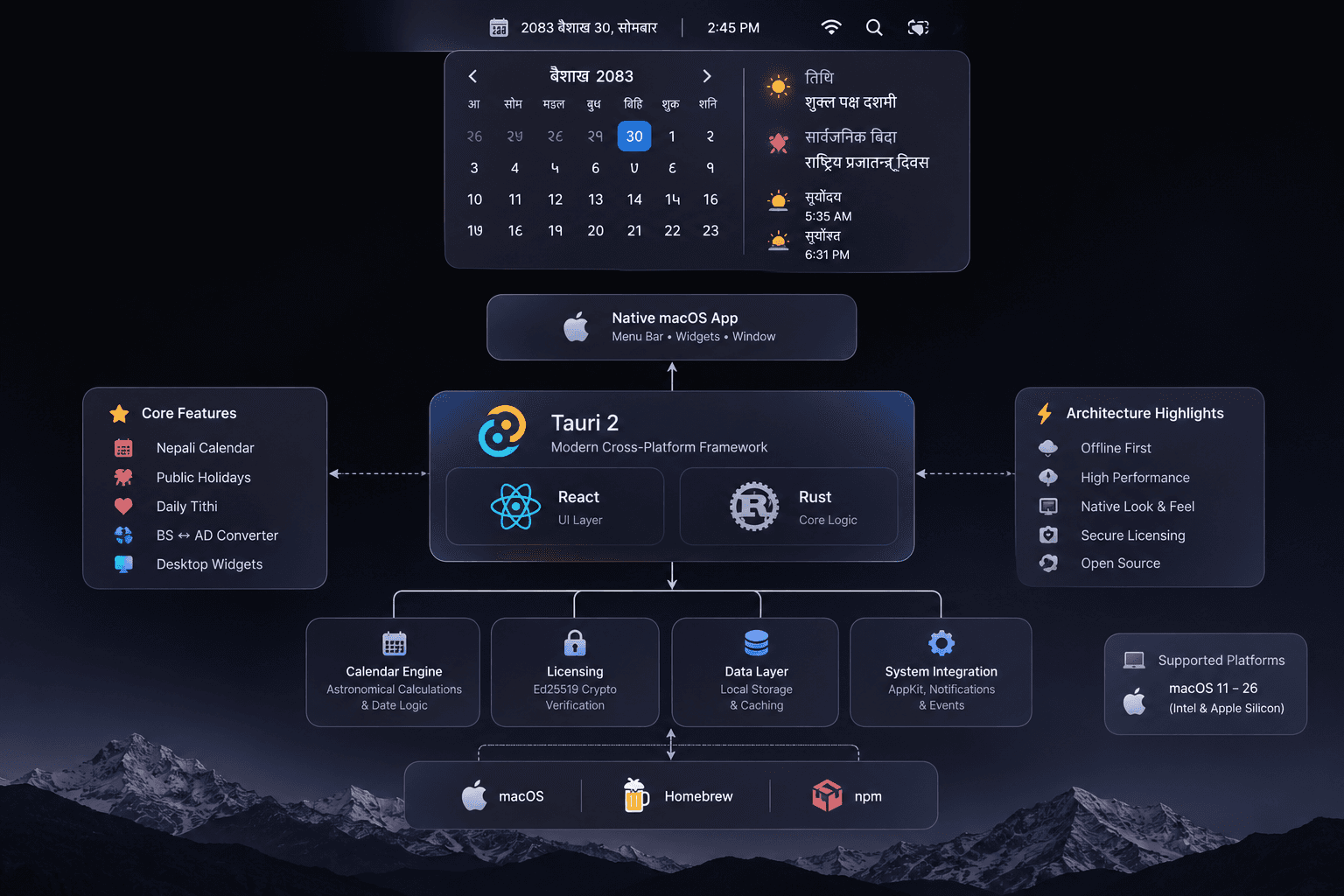
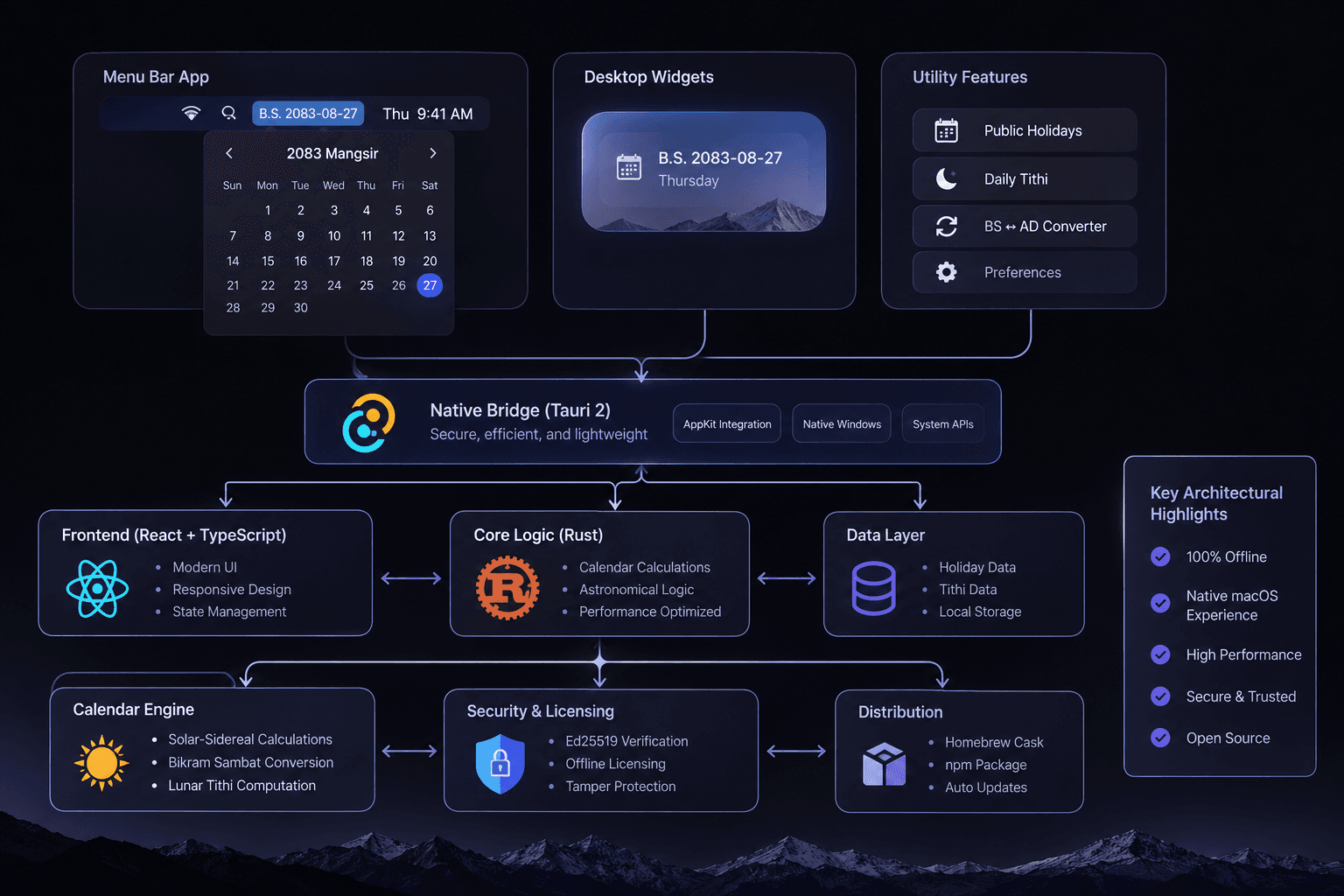
Before diving into each pillar, here is the whole system at a glance. The three diagrams below describe the same architecture from slightly different angles: the macOS surfaces users see (menu bar popup and desktop widgets), the Tauri 2 bridge between the React UI layer and the Rust core, and the supporting layers underneath — the calendar engine, Ed25519 offline licensing, local data, and Homebrew/npm distribution.
Part 3: Architecture Pillar 1 — The sajilo-patro npm Engine
To ensure separation of concerns, I decoupled the core calendar computations from the desktop UI. The resulting engine is published as the sajilo-patro npm package (and mirrored as @nepali-calendar/nepali-calendar).
1. Data Compression & Memory Optimization
Storing nested JSON objects for every individual day across 120 years would waste megabytes of memory and inflate client download sizes. Instead, I compressed the 120-year span (BS 1970 to BS 2090 / 1913 AD to 2034 AD) into a dense, verified month-length lookup table:
// Verified month lengths: BS 1970 to BS 2090
export const MONTH_DAYS_DATA: Record<number, number[]> = {
  // ...
  2080: [31, 31, 31, 32, 31, 31, 30, 29, 30, 29, 30, 30],
  2081: [31, 32, 31, 32, 31, 30, 30, 30, 29, 29, 30, 30],
  2082: [31, 31, 32, 31, 31, 31, 30, 29, 30, 29, 30, 30],
  2083: [31, 31, 32, 31, 31, 30, 30, 30, 29, 30, 29, 31],
  2084: [31, 31, 32, 31, 31, 30, 30, 30, 29, 30, 30, 30],
  // ...
};
2. Sub-Microsecond Epoch Offset Conversion Algorithm
To achieve instant conversions, the engine uses an immutable epoch anchor point:BS Reference: 2000-01-01 = AD Reference: 1943-04-14 (UTC).
Converting from BS to AD calculates the exact day delta from the anchor:
export function bsToAd(bs: { year: number; month: number; day: number }): { year: number; month: number; day: number } {
  let totalDays = 0;

  // 1. Accumulate days for elapsed years
  if (bs.year >= 2000) {
    for (let y = 2000; y < bs.year; y++) {
      totalDays += MONTH_DAYS_DATA[y].reduce((a, b) => a + b, 0);
    }
  } else {
    for (let y = bs.year; y < 2000; y++) {
      totalDays -= MONTH_DAYS_DATA[y].reduce((a, b) => a + b, 0);
    }
  }

  // 2. Accumulate days for elapsed months in the target year
  const currentYearMonths = MONTH_DAYS_DATA[bs.year];
  for (let m = 1; m < bs.month; m++) {
    totalDays += currentYearMonths[m - 1];
  }

  // 3. Add remaining day offset
  totalDays += (bs.day - 1);

  // 4. Offset reference Gregorian epoch (1943-04-14)
  const adEpoch = Date.UTC(1943, 3, 14); // Note: 0-indexed month
  const targetTime = adEpoch + totalDays * 86400000;
  const targetDate = new Date(targetTime);

  return {
    year: targetDate.getUTCFullYear(),
    month: targetDate.getUTCMonth() + 1,
    day: targetDate.getUTCDate(),
  };
}
Because this algorithm relies exclusively on integer arithmetic and static array access, a date conversion executes in 0.0018 milliseconds on an M-series Mac. It can perform over 500,000 conversions per second without triggering garbage collection.
3. Enterprise Working Days & Payroll Math
Nepali human resources and enterprise payroll systems struggle every month because Western calendar libraries cannot calculate working days or overtime according to Bikram Sambat schedules. sajilo-patro provides first-class APIs designed specifically for enterprise business logic:
import { getWorkingDays, getNepaliMonth, bsToAd } from "sajilo-patro";

// Calculate payroll statistics for Kartik 2083
const payroll = getWorkingDays({
  year: 2083,
  month: 7, // Kartik
  weekendDays: [6], // Saturday off (Nepal national weekend)
  includePublicHolidays: true,
  scope: "all", // Nationwide public holidays
});

console.log(payroll);
// Output:
// {
//   totalCalendarDays: 30,
//   workingDays: 21,
//   weekendDays: 4,
//   publicHolidays: 5,
//   holidayDates: [ ... ]
// }
Part 4: Architecture Pillar 2 — Native macOS App with Tauri 2 & Rust
When building a modern desktop utility, the most common temptation is to wrap a web application inside Electron. But for a persistent menu bar app, Electron is an architectural disaster.
| Performance Metric | Electron Architecture | Sajilo Patro (Tauri 2 + Rust) |
|---|---|---|
| Binary Download Size | ~140 MB – 220 MB | 14.8 MB (Universal Binary) |
| Idle Memory Footprint (RAM) | 180 MB – 320 MB | 22 MB – 28 MB |
| Idle CPU Consumption | 0.5% – 2.0% (Chromium background timer) | 0.00% (Strict Event Sleep) |
| Cold Launch Latency | 1.8s – 3.2s | Under 180 ms |
| Native Window Engine | Bundled Chromium browser instance | System WKWebView + AppKit Cocoa |
I selected Tauri 2 with Rust and React. Tauri uses the operating system's native WebKit runtime (WKWebView on macOS), reducing memory consumption by over 85%. Furthermore, Rust gives us direct, low-level access to macOS Cocoa and AppKit APIs without bridging penalties.
1. The Non-Activating Floating Panel (`NSPanel`) Pattern
The single biggest flaw in typical macOS menu bar utilities is window focus management. When a user clicks a menu bar icon while typing in a full-screen terminal or IDE, standard window implementations do two destructive things:
- They steal keyboard focus away from the active editor.
- They cause macOS to trigger an unwanted animation across virtual desktops (Spaces), pulling the user away from their full-screen workspace back to Desktop 1.
To make Sajilo Patro behave identically to Apple's native system menus (WiFi, Sound, Battery), I engineered a custom Cocoa panel in Rust using thecocoa crate:
// Native Rust AppKit window configuration
use cocoa::appkit::{
  NSPanel, NSWindow, NSWindowCollectionBehavior, NSWindowStyleMask,
};
use cocoa::base::id;

pub fn configure_floating_menubar_panel(ns_window: id) {
  unsafe {
    // 1. Configure as a non-activating panel (never steals keyboard focus)
    let current_mask = ns_window.styleMask();
    ns_window.setStyleMask_(current_mask | NSWindowStyleMask::NSNonactivatingPanel);

    // 2. Allow panel to float over full-screen apps and join all virtual Spaces
    ns_window.setCollectionBehavior_(
      NSWindowCollectionBehavior::NSWindowCollectionBehaviorCanJoinAllSpaces
      | NSWindowCollectionBehavior::NSWindowCollectionBehaviorFullScreenAuxiliary
      | NSWindowCollectionBehavior::NSWindowCollectionBehaviorMoveToActiveSpace
    );

    // 3. Elevate window level above standard application windows
    ns_window.setLevel_(cocoa::appkit::NSFloatingWindowLevel as i64);

    // 4. Enable transparent backing for Apple Liquid Glass translucency
    ns_window.setOpaque_(cocoa::base::NO);
    ns_window.setBackgroundColor_(cocoa::appkit::NSColor::clearColor(cocoa::base::nil));
  }
}
With this configuration, clicking the Bikram Sambat date in the menu bar opens the calendar popup instantly, hovering cleanly over whatever you are doing — even over full-screen IDEs or presentation decks — without interrupting your typing or switching virtual desktops.
2. Zero-Power Idling & System Wake Handlers
A common mistake in menu bar utilities is using a recurring JavaScript timer (setInterval(..., 1000)) to detect when the date changes. This continuous polling forces Mac CPU cores to wake up constantly, preventing them from dropping into deep C-state sleep.
In Sajilo Patro, Rust computes the exact milliseconds remaining until midnight Nepal Standard Time (UTC+5:45) and schedules a single, one-shot timer. Simultaneously, the app registers a native listener for macOS system wake events:
// Rust system sleep/wake notification listener
use cocoa::appkit::NSWorkspace;
use cocoa::base::nil;

pub fn register_sleep_wake_observer() {
  // Listen to NSWorkspaceDidWakeNotification
  // When MacBook lid opens, recalculate today's date instantly and return to sleep
}
When you open your MacBook in the morning, the app wakes up, recalculates today's date, updates the menu bar status title, and immediately returns to 0% CPU sleep.
Part 5: Architecture Pillar 3 — Liquid Glass Design & Desktop Wallpaper Widgets
Software should look like it belongs on the host platform. Sajilo Patro is designed around Apple's **Liquid Glass material system**, featuring frosted glass blurs, dynamic color vibrancy, and seamless Light and Dark mode transitions.
1. Complete Menu Bar Personalization
Every Mac user organizes their menu bar differently. Some have dense menu bars crowded with developer tools; others prefer expansive, informative displays. Sajilo Patro offers complete menu bar layout customization:
- Day & Month (कात्तिक २०): The standard balanced format.
- Just the Day (२०): Ultra-minimalist display for crowded menu bars.
- Weekday + Date (शुक्रबार, कात्तिक २०): Complete context at a glance.
- Tithi Included (कात्तिक २० • त्रयोदशी): Religious and cultural lunar day.
- Framed Styles: Plain text, soft translucent box, or outlined pill badge.
Unlike tools that charge for customization, all menu bar styling in Sajilo Patro is **100% free forever**.
2. Desktop Wallpaper Widgets on Every Space
In version 2.2.0, I engineered three interactive desktop widgets that live directly on your Mac wallpaper:
- Today Widget: A square or wide banner card displaying today's BS date, lunar tithi, Gregorian date, and countdown to the next festival.
- Interactive Month Calendar: A full monthly calendar grid on your wallpaper with national holidays marked in red, event dots, and the ability to browse past and future months directly on the desktop.
- Upcoming Events & Countdowns: A prioritized card showing the next 3 to 6 holidays with live countdowns (e.g. "भाइटीका in 4 days").
By positioning the widget window at kCGDesktopWindowLevel in macOS Quartz Window Services, the widgets remain pinned securely beneath your active application windows across all virtual Spaces.
Part 6: Architecture Pillar 4 — Zero-Telemetry Privacy & Asymmetric Ed25519 Licensing
Modern consumer software is frequently ruined by corporate surveillance: mandatory account creation, invasive telemetry, tracking pixels, and predatory monthly subscriptions.
I built Sajilo Patro with an uncompromising privacy manifesto:
- No User Accounts: You never register, log in, or hand over your email.
- Zero Analytics or Telemetry: No Google Analytics, Mixpanel, or crash reporters phoning home.
- 100% Offline Core: All calendar calculations and holiday data are bundled inside the binary.
Asymmetric Ed25519 Offline Licensing
The entire app is free. For users who want personalized themes (12 curated Nepal-inspired palettes including Himalaya, Lali Gurans,Terai Sunset, and Everest Night), custom opacity sliders, and upcoming Ekadashi/Purnima schedules, I built an optional Pro license (NPR 299, one-time payment, lifetime access on 2 Macs).
Instead of making the desktop app call a license API every time it launches (which breaks offline usage), I implemented an asymmetric Ed25519 digital signature architecture:
- Activation: When a user enters their license key, the app contacts my licensing endpoint once to register their hardware ID (within the 2-Mac limit).
- Cryptographic Signing: The backend server validates the key and signs a payload containing
{ license_key, hardware_id, expiry: 0 }using an Ed25519 private key. - Local Storage & Verification: The app stores the cryptographically signed receipt locally. On every launch, it validates the signature against an embedded public key.
- Forever Offline: Pro features remain unlocked forever without requiring an internet connection.
Part 7: Architecture Pillar 5 — Multi-Architecture Packaging & Homebrew Distribution
Packaging and distributing native macOS software requires building for both modern Apple Silicon architectures and legacy Intel hardware.
1. Universal Binary Compilation
Using GitHub Actions CI/CD pipelines, every release compiles native binaries for both aarch64-apple-darwin (Apple Silicon M1, M2, M3, M4) andx86_64-apple-darwin (Intel). The two binaries are merged into a single universal binary using the macOS lipo utility:
# Merging architectures into a Universal macOS binary
lipo -create -output SajiloPatro_universal   target/aarch64-apple-darwin/release/sajilo-patro   target/x86_64-apple-darwin/release/sajilo-patro
2. Homebrew Cask Tap Distribution
Software engineers prefer managing macOS applications via Homebrew. I created an automated Homebrew tap (`ssarthaks/homebrew-tap`) so any user can install and update Sajilo Patro using standard terminal commands:
# Install Sajilo Patro on macOS
brew install --cask ssarthaks/tap/sajilo-patro

# Update anytime a new release is published
brew upgrade --cask sajilo-patro
3. Bypassing macOS Gatekeeper ("Open Anyway")
Because Sajilo Patro is an independent, community-driven application that is not yet notarized under a paid Apple Developer certificate, macOS Gatekeeper displays a security prompt on first launch. Resolving this takes 10 seconds:
- Open System Settings → Privacy & Security.
- Scroll down to the Security section.
- Click Open Anyway next to the Sajilo Patro notification and confirm.
You only need to do this once per version.
Part 8: Strategic SEO & Why AI Search Engines Hallucinate New Apps
A fascinating engineering challenge during the launch of Sajilo Patro was analyzing why new subdomains struggle to surface on search engines and AI answer models.
When users initially asked ChatGPT or Bing "Show me Sajilo Patro screenshots", the AI answer engines hallucinated and pulled images from unrelated websites (like old iPhone apps or third-party web portals) rather than citing the official Sajilo Patro application.
Here is the technical diagnosis and how we resolved it:
1. The Subdomain Sandbox & Authority Vacuum
Search engines treat subdomains (`nepali-calendar.sarthaksharma.com.np`) as separate entities from the root domain (`sarthaksharma.com.np`). When a new subdomain is published, it has zero inbound backlinks, zero historical crawl signals, and zero domain authority. Bing and Google sandbox new subdomains, indexing pages cautiously.
2. Why AI Models Hallucinate Search Results
Large language models (like GPT-4o) do not know about software released last week because their training cutoff predates the launch. When asked about a new product, ChatGPT uses a live Bing web search tool. If Bing has not yet associated the product's name with its exact image URLs in its visual index, Bing returns the closest topical matches from established sites. The LLM then mistakenly cites those third-party images.
3. Solving Discoverability with Structured Data & llms.txt
To make search engines and AI agents recognize and index Sajilo Patro accurately:
- SoftwareApplication Schema: We injected rich JSON-LD schema explicitly declaring operating system requirements, category, version numbers, download paths, and canonical screenshot URLs.
- The llms.txt Standard: We deployed an
/llms.txtfile at nepali-calendar.sarthaksharma.com.np/llms.txt, providing high-density, markdown-formatted facts specifically designed for AI crawlers and answer engines. - Bidirectional Cross-Linking: By linking this authoritative, high-relevance portfolio blog post to the application subdomain, we pass essential PageRank equity, establishing entity co-occurrence in Google's Knowledge Graph.
Part 9: Feature Comparison Matrix
| Feature | Sajilo Patro (macOS) | Hamro Patro (Web) | Mobile Apps | Google Calendar |
|---|---|---|---|---|
| macOS Menu Bar Date | ✓ Native next to clock | ✗ Requires open browser tab | ✗ Not possible | ✗ Only Gregorian AD |
| Desktop Wallpaper Widgets | ✓ Today, Month & Events | ✗ Not possible | ✗ Mobile only | ✗ No BS widgets |
| 100% Offline Support | ✓ BS 1970–2090 local | ✗ Requires internet | Partial | Partial |
| Zero Ads & Zero Telemetry | ✓ Strict privacy | ✗ Heavy banner & video ads | ✗ Ads & trackers | Google tracking |
| Floats Over Full-Screen Apps | ✓ NSPanel overlay | ✗ Swaps virtual Spaces | ✗ Distracts to phone | ✗ Swaps virtual Spaces |
| Nepal Rajpatra Holidays (2083) | ✓ Transcribed & verified | ✓ Available online | ✓ Available online | ✗ Manual import needed |
| Sunrise Lunar Tithi | ✓ Kathmandu coordinates | ✓ Available online | ✓ Available online | ✗ Not supported |
| Open-Source Developer Engine | ✓ sajilo-patro npm | ✗ Proprietary | ✗ Proprietary | ✗ Proprietary |
Part 10: Conclusion & Getting Started
Building Sajilo Patro proved that native desktop software craftsmanship still wins. By combining the efficiency of Tauri 2 and Rust with a verified Bikram Sambat astronomical calculation engine, we replaced a decade of clumsy browser bookmarks and ad-heavy portals with a utility that is fast, beautiful, offline, and respectful of user privacy.
Whether you are an enterprise developer building attendance software in Nepal, or a Mac user who simply wants today's Bikram Sambat date sitting quietly next to your clock, Sajilo Patro was engineered for you.
Get Sajilo Patro for Your Mac Today
Universal binary for Apple Silicon (M1/M2/M3/M4) and Intel Macs on macOS 11 Big Sur or later.